
Automated SMS Reminders
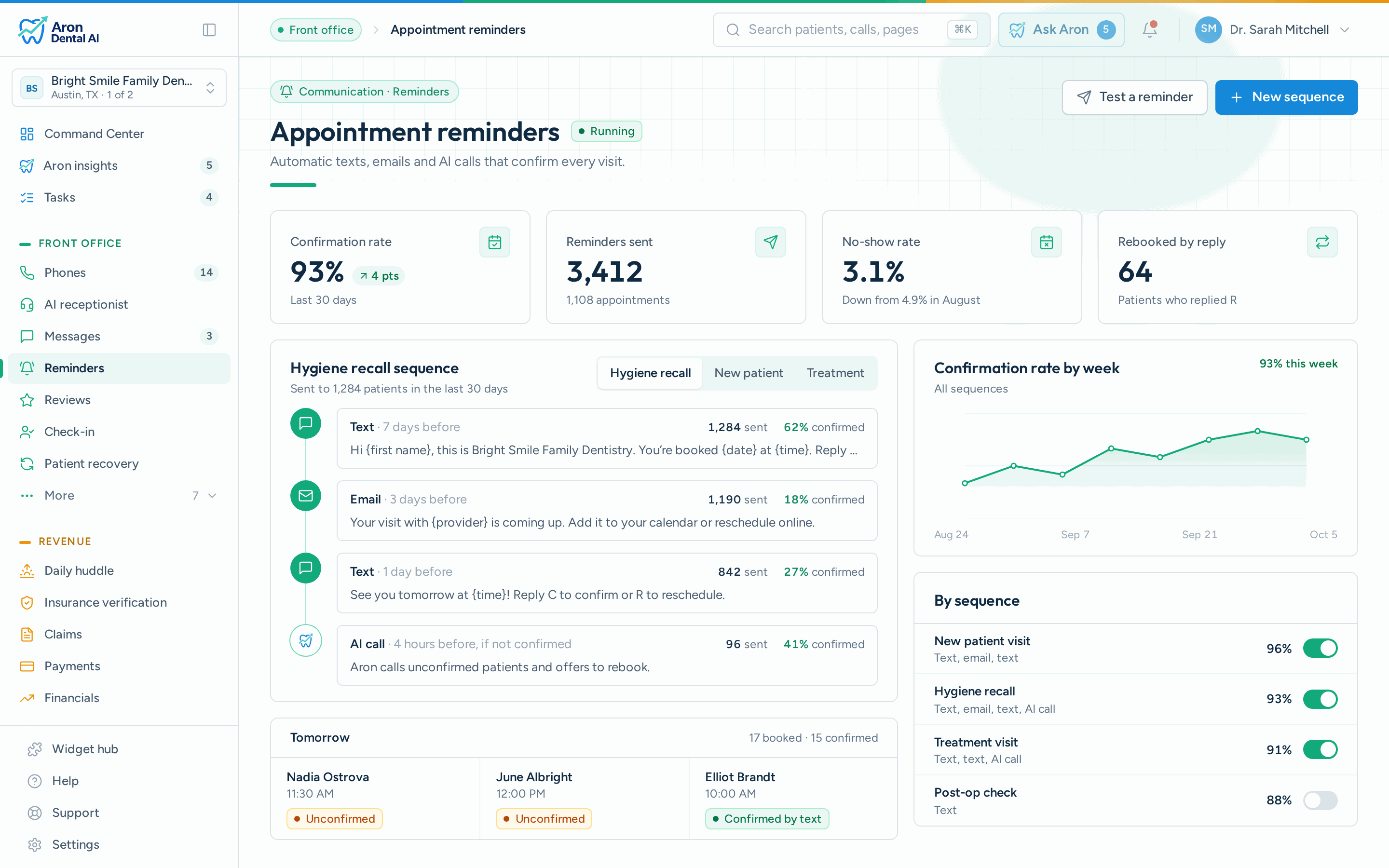
Send text reminders at 48 hours and 2 hours before each appointment. Patients confirm with a simple reply, no app download needed.
Product›Communication
Communication · Appointment reminders
No-shows cost the average dental practice $50,000+ per year. Aron's automated SMS and email reminders reduce no-shows by up to 50%, with zero manual effort from your team.
What it does
Link your practice management system. Aron syncs your appointment schedule automatically.
Choose when to send reminders, customize your message templates, and set confirmation keywords.
The system automatically sends SMS and email reminders based on your schedule. Zero manual work.
Patient replies are automatically detected. Confirmed appointments update in real-time on your dashboard.
Included
Everything you need to keep your schedule full
Most missed dental appointments aren't a statement about your practice. Hygiene visits get booked six months out at the end of the previous appointment, land in nobody's calendar, and quietly collide with a school pickup or a work trip. By the time the day arrives the patient has genuinely forgotten it exists.
That's why a reminder does two different jobs. The day-of message catches the forgetful patient and gets them in the chair. The 48-hour message does something more valuable: it gives the patient who can't make it a graceful way to say so while you still have two days to fill the slot from your waitlist. A cancellation you learn about on Tuesday is a rebooking. The same cancellation discovered at 9:02 on Thursday morning is an empty chair.
The third job is anxiety, which drives a meaningful share of dental no-shows. A reminder that names the provider, tells the patient where to park and links their intake forms lowers the friction of showing up for someone who is already nervous about the visit.
Start here, then adjust per appointment type. Every interval is optional.
These ship with Aron and fill themselves in from your schedule. Edit any word of them, the merge fields do the rest.
Keep reminders to the minimum necessary information, practice, date, time and one instruction. No diagnosis or treatment detail should ever go out over text.
Reminders are one part of keeping the schedule full.
Outcomes
Send text reminders at 48 hours and 2 hours before each appointment. Patients confirm with a simple reply, no app download needed.
Automated email reminders with appointment details, directions, and a one-click confirm button for patients who prefer email.
Set exactly when reminders go out, 72h, 48h, 24h, or 2h before. Configure different schedules for different appointment types.
Works with the PMS you already use
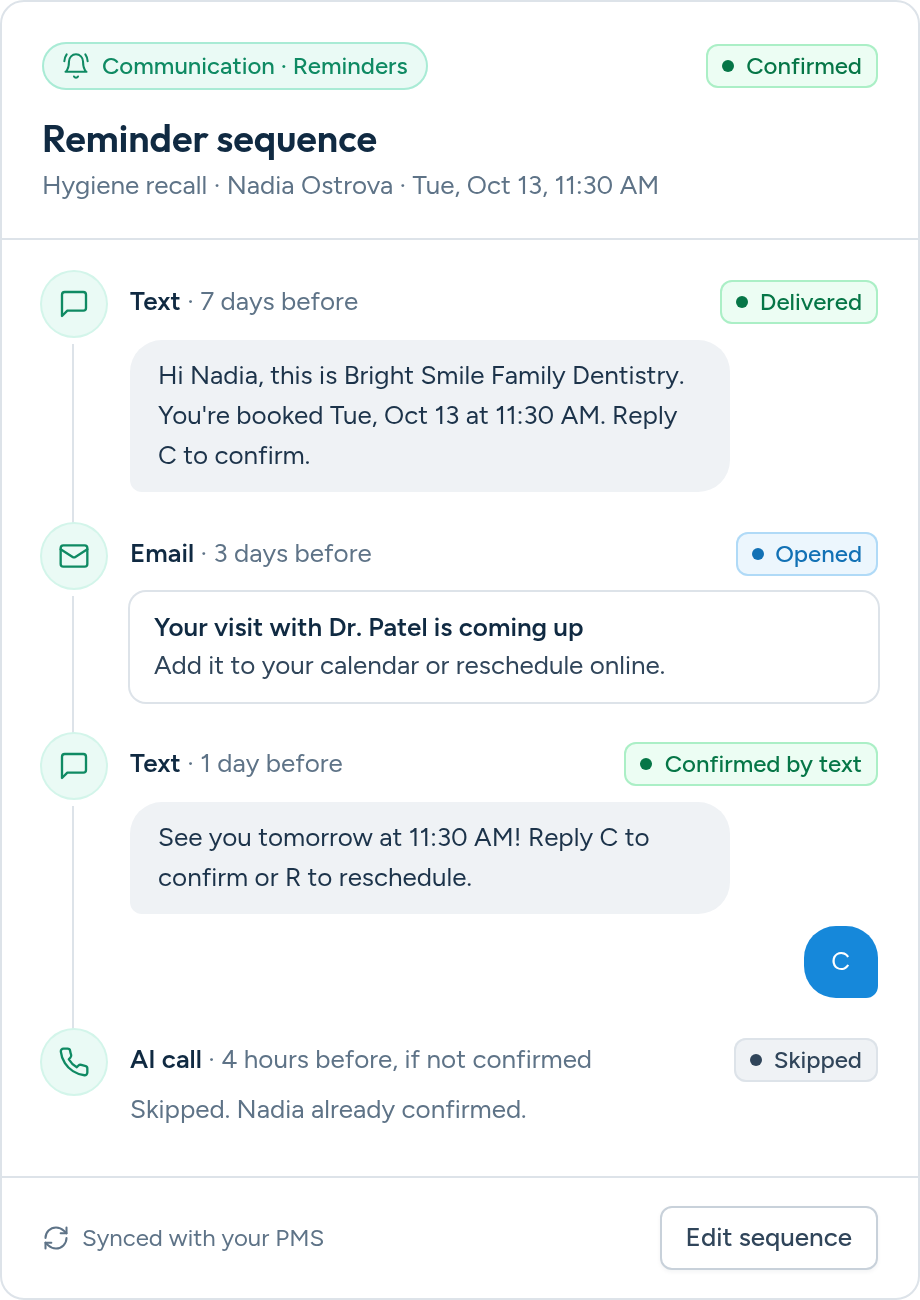
Keep it to four things: who you are, when the appointment is, who they're seeing, and one clear instruction. Something like: 'Hi Sarah, this is Bright Smile Dental. You're scheduled with Dr. Lee on Thursday at 2:00pm. Reply C to confirm or call 555-0134 to reschedule.' Avoid clinical detail because reminders travel over SMS. Include only the minimum information a patient needs.
Two touches works best for most practices: one 48 hours before, which gives you time to refill the slot if the patient can't make it, and one about two hours before, which catches the patient who simply forgot. A third reminder at 24 hours is worth adding only for patients who haven't confirmed yet, so your reliable patients aren't over-messaged.
Patients can reply to the SMS with 'C', 'Confirm', 'Yes', or 'Y'. The system automatically detects the confirmation and updates your dashboard. They can also click a confirm button in email reminders.
Unconfirmed patients are flagged on your Morning Huddle dashboard so your front desk can follow up with a phone call. You can also set up automatic follow-up reminders.
Reminders address the largest single cause of dental no-shows: simply forgetting. Most missed appointments are booked months in advance at the previous visit. They also do something less obvious but equally valuable: a patient who replies to cancel two days out gives you a slot you can still fill, which turns a total loss into a rebooking.
Yes. You can configure up to 3 reminder intervals per appointment type. Most practices use 48-hour and 2-hour reminders, but you have full control.
They can be, and ours are. The rule is minimum necessary information: a reminder should name the practice, the date and the time, and nothing about diagnosis or treatment. Aron sends through encrypted channels, honors patient communication preferences and opt-outs, and we sign a Business Associate Agreement with every practice.
We recommend disabling PMS-native reminders once Aron is configured to avoid duplicates. Aron's reminders are more customizable and include confirmation tracking.
No. Reminders are included in your Aron subscription with no per-message fees. Send as many as your schedule requires.
Yes, and that's the point of running reminders on a real two-way number. If a patient replies 'can I move to Friday?', the message lands in your team's inbox as a normal conversation rather than disappearing into a no-reply system.
Reminders are sent from a dedicated phone number assigned to your practice. Patients can save it as your office number for easy recognition.
Yes. Booked appointments get confirmation reminders, and patients who are due but not yet scheduled get recall messages with a booking link, so both halves of a full schedule are covered.
Every empty chair is lost revenue. Automated reminders keep your schedule full and your production on track.