
1 view
Product›Platform
Platform · Dental Practice Management Software
Dental Practice Management Software That Connects the Work
Aron works alongside your existing dental PMS to connect scheduling, patient communication, insurance workflows, forms, revenue visibility, and marketing analytics in one operational platform.
What it does
How it works in Aron
01
Connect Your Practice
Link your PMS, set up your practice profile, and configure your team. Aron syncs the providers, schedules, and patient data available through your connection.
02
Digitize Your Workflows
Replace paper forms with digital intake. Configure patient reactivation, communication templates, and the outreach workflows enabled for your practice.
03
Run Your Morning Huddle
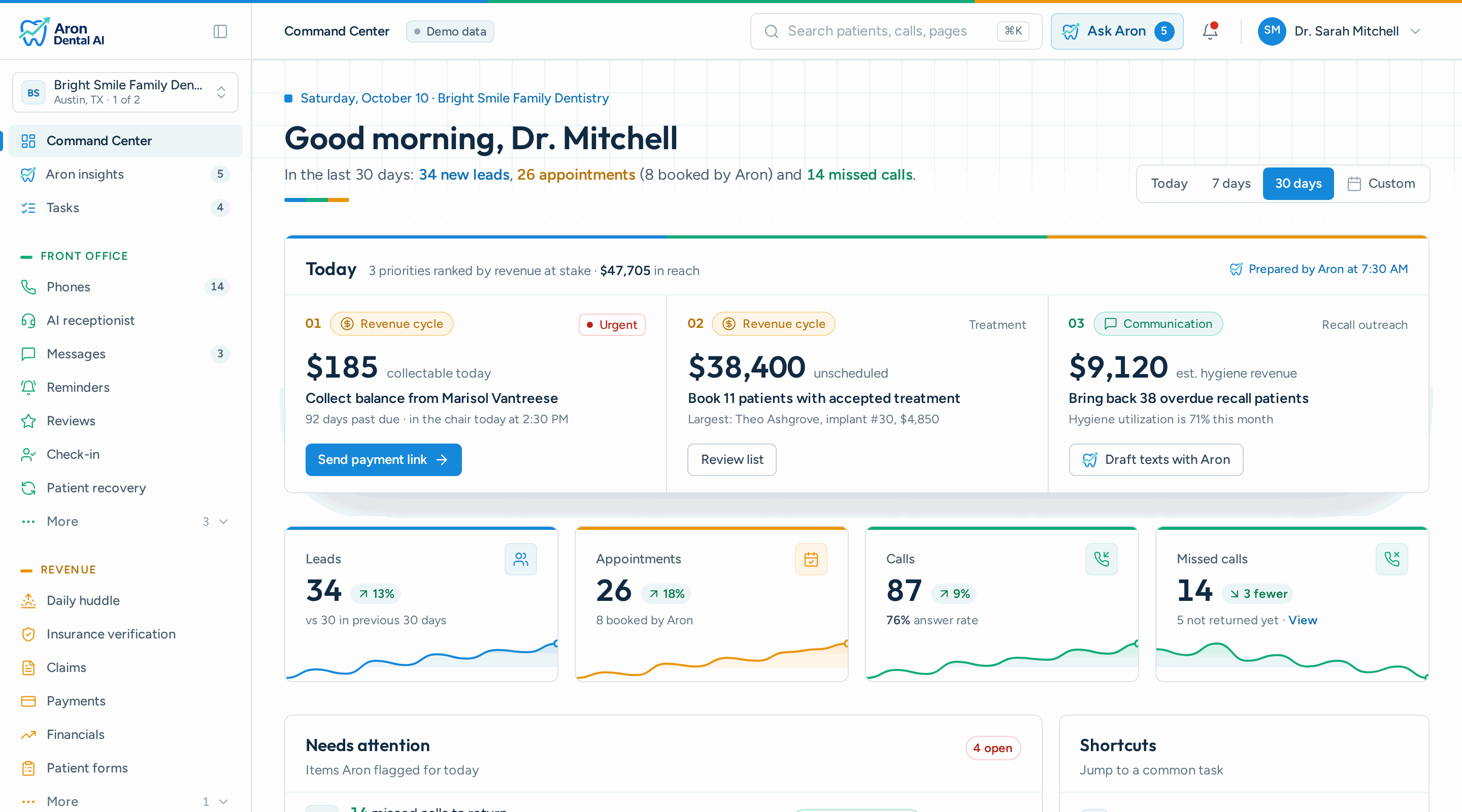
Every morning, see today's appointments, production targets, and patient notes in one dashboard. Know who's coming, what they need, and how you're tracking.
04
Grow with AI Insights
Aron's AI Growth Manager analyzes connected practice data and surfaces trends, missed opportunities, and recommended action items.
Included
What's included
- Morning Huddle Dashboard — Start every day with a clear view of scheduled appointments, production goals, and patient notes, pulled live from your PMS.
- Patient Reactivation — Automatically identify patients overdue for care (6+ months) and trigger personalized outreach via SMS or email to bring them back.
- Digital Patient Forms — Custom intake forms, medical history, and consent documents, submitted digitally and prepared for the patient record, with chart delivery on supported integrations.
- Communication Hub — Unified SMS inbox for all patient conversations. Send messages, review request follow-ups, and appointment reminders from one place.
- Practice Analytics — Track production, new patients, call volume, chatbot leads, and marketing ROI in real-time dashboards with actionable insights.
- PMS Integration — Connect with widely used dental systems to bring available patient, schedule, provider, and financial data into shared workflows.
- Online Scheduling & Appointment Management — Offer services and available times based on your practice's scheduling rules. New- and existing-patient paths help patients reach the right appointment flow without replacing your established calendar.
- Patient Communication & AI Receptionist — Bring calls, text conversations, reminders, and patient messages into connected workflows. Your team can follow up from one place while the AI receptionist handles configured call scenarios around the clock.
- Digital Forms & Patient Intake — Send digital intake, medical history, and consent forms before the visit. Completed documents can be organized for the patient record, with chart delivery available for supported integrations.
- Insurance Verification & Claims — Review eligibility details, key benefits, deductibles, and procedure-level patient responsibility when payer data is available. Claims workflows add validation and status visibility for teams managing dental billing.
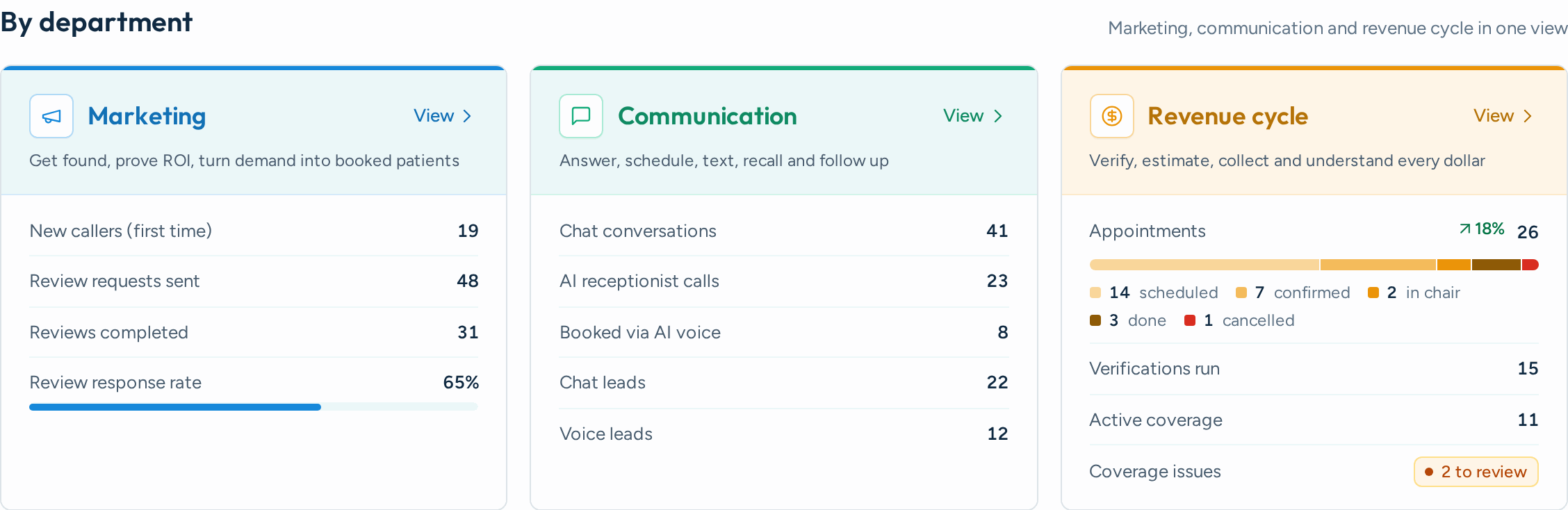
- Revenue Cycle Visibility — See accounts receivable, unscheduled treatment, payment activity, and production context in practical work queues. This helps teams prioritize follow-up instead of piecing together separate reports.
- Marketing Attribution & Practice Analytics — Connect tracked calls, website enquiries, chatbot leads, and booking links to matched patient records. Where ledger data is available, Aron reports completed production by source rather than relying on assumed patient value.
- Integration depth — Confirm which patient, appointment, provider, ledger, and document workflows your current system can support, not just whether its name appears on an integration list.
- Scheduling safeguards — Look for service-to-provider rules, location-specific availability, new-versus-existing patient paths, and protections against offering time that is no longer open.
- Clear source data — Dashboards should distinguish live practice data, calculated insights, and unavailable fields. Missing information should stay visibly unavailable instead of becoming a misleading estimate.
- Workflow fit — Evaluate how the software supports the front desk, office manager, treatment coordinator, billing team, and leadership, not simply how many features appear on a checklist.
- Multi-location controls — Groups need location-level settings and reporting alongside centralized oversight, so schedules, communications, and results remain correctly separated by practice.
- Privacy and permissions — Ask how access is controlled, how sensitive patient information is handled, and which actions require staff review before they reach a patient or clinical system.
The connected operations layer
What Is Dental Practice Management Software?
Dental practice management software is the system a dental office uses to organize patient records, schedules, billing, insurance information, clinical documentation, and business reporting. It serves as the core system of record for the practice.
Aron does not ask you to replace that foundation. It connects to the practice management system you already use and brings together the work that happens around it: answering patients, filling the schedule, collecting forms, reviewing insurance information, following up on treatment, understanding revenue, and measuring marketing results.
This approach gives the team a modern dental office management experience while preserving the patient and financial records already established in the PMS.
Keep the PMS. Connect the workflows.
Your PMS remains the source of truth. Aron adds a shared workspace for operational tasks and patient engagement, based on the data each supported connection makes available.
One Platform for the Work Around Your Dental PMS
Connect the patient journey from the first enquiry through scheduling, care, follow-up, payment, and reporting.
Traditional Dental PMS vs. a Connected Practice Platform
These systems solve different parts of the practice. Aron complements the clinical and financial record instead of duplicating it.
- Core records: Patient charts, clinical notes, ledger, claims, and appointments — Uses available PMS data to support operational workflows and reporting
- Patient access: Staff-managed scheduling and patient details — Online booking paths, reminders, forms, calls, texts, and chatbot enquiries
- Daily operations: Individual schedules and standard reports — Morning huddle, follow-up work queues, and cross-workflow visibility
- Growth measurement: Production and patient reporting — Lead-source attribution connected to matched patients and available production
How to Choose Dental Practice Management Software
The best choice is the one that fits your actual workflows, data, team responsibilities, and growth priorities.
Built Around the Dental Team's Day
Give each role a clearer next action without creating another isolated system.
- Front desk: Manage calls, texts, booking requests, reminders, forms, and patient follow-up without jumping between disconnected tools.
- Office manager: Start with a daily operational view of the schedule, provider coverage, patient needs, balances, and production context.
- Treatment coordinator: Find unscheduled treatment and prioritize patients who need a clear next step, using available procedure and account information.
- Multi-location leadership: Compare activity by location while preserving each practice's scheduling rules, communication settings, and connected account data.
Your Entire Practice at a Glance
Morning huddles, patient data, and AI insights, all in one dashboard
Built for How Dental Practices Actually Work
From morning huddle to end-of-day reporting
How It Works
Connect, configure, and run your practice more efficiently
Frequently Asked Questions
Outcomes
What changes for your practice
24/7
AI-assisted patient response
Multi-site
location-level workflows and reporting
Works with the PMS you already use
- Open Dental
- Dentrix
- Eaglesoft
- Curve Dental
- Denticon
- Dolphin
- Tracker
- Cloud 9
Questions?
What is dental practice management software?
Dental practice management software helps a dental office organize patient records, appointments, billing, insurance, clinical documentation, and reporting. Aron works alongside that core system as a connected operations layer for communication, scheduling, patient engagement, revenue visibility, marketing attribution, and daily practice workflows.
Does Aron replace my current dental practice management system?
No. Aron is designed to work with your existing practice management system rather than forcing a complete replacement. Your PMS remains the clinical and financial system of record, while Aron connects patient-facing workflows, automation, and operational reporting around it.
What are the key features to look for in dental practice management software?
Start with reliable scheduling, patient records, billing and insurance support, communications, forms, reporting, permissions, and multi-location controls. Then examine integration depth and workflow fit. A long feature list matters less if the software cannot reflect your providers, appointment types, locations, and existing office processes accurately.
How do I choose dental office management software?
Map the daily tasks that cost your team the most time, identify which data must stay in your current PMS, and ask vendors to demonstrate those workflows using your real scheduling and reporting requirements. Confirm implementation support, integration limits, data ownership, privacy practices, and how the platform handles missing or delayed source data.
What practice management systems do you integrate with?
Aron supports connections with widely used dental practice management systems, including Dentrix, Open Dental, Eaglesoft, Curve Dental, Denticon, and others. Available data and write-back capabilities vary by source system and practice configuration, so integration scope is confirmed during setup.
How does the Morning Huddle work?
The Morning Huddle pulls today's appointments directly from your PMS and displays them alongside production goals, patient notes, and provider schedules. It's a live, at-a-glance view of your day, no manual prep needed.
How does patient reactivation work?
Aron automatically identifies patients who haven't visited in 6+ months by analyzing your appointment history. You can then send targeted SMS or email outreach with one click, and track engagement through to reactivation.
Can patients fill out forms before their appointment?
Yes. Practices can send patients a link to digital intake forms before the visit. Completed forms are available as organized documents, and supported integrations can deliver them to the patient chart.
How is patient data matched in the PMS?
Aron uses a three-tier matching strategy: primary email search, fallback name search, and DOB disambiguation. This ensures forms and bookings are correctly attached to the right patient chart even when contact details differ.
Do you support multi-location practices?
Yes. Each location gets its own dashboard, scheduling configuration, and communication preferences while administrators maintain centralized oversight across all locations.
What analytics are available?
Track production, new patient volume, call recordings, chatbot leads, review ratings, marketing campaign performance, Google Ads ROI, and more, all from a single dashboard with exportable reports.
Is this HIPAA-aligned?
Yes. All data is encrypted in transit and at rest. Patient forms, communications, and records are handled following HIPAA guidelines. We process PHI only through secure, encrypted channels.
Ready to Modernize Your Practice?
Join dental practices using Aron to streamline operations, reactivate patients, and grow revenue.