
85%
Revenue cycle · Dental Patient Forms
Digital Dental Patient Forms Built for Your Practice
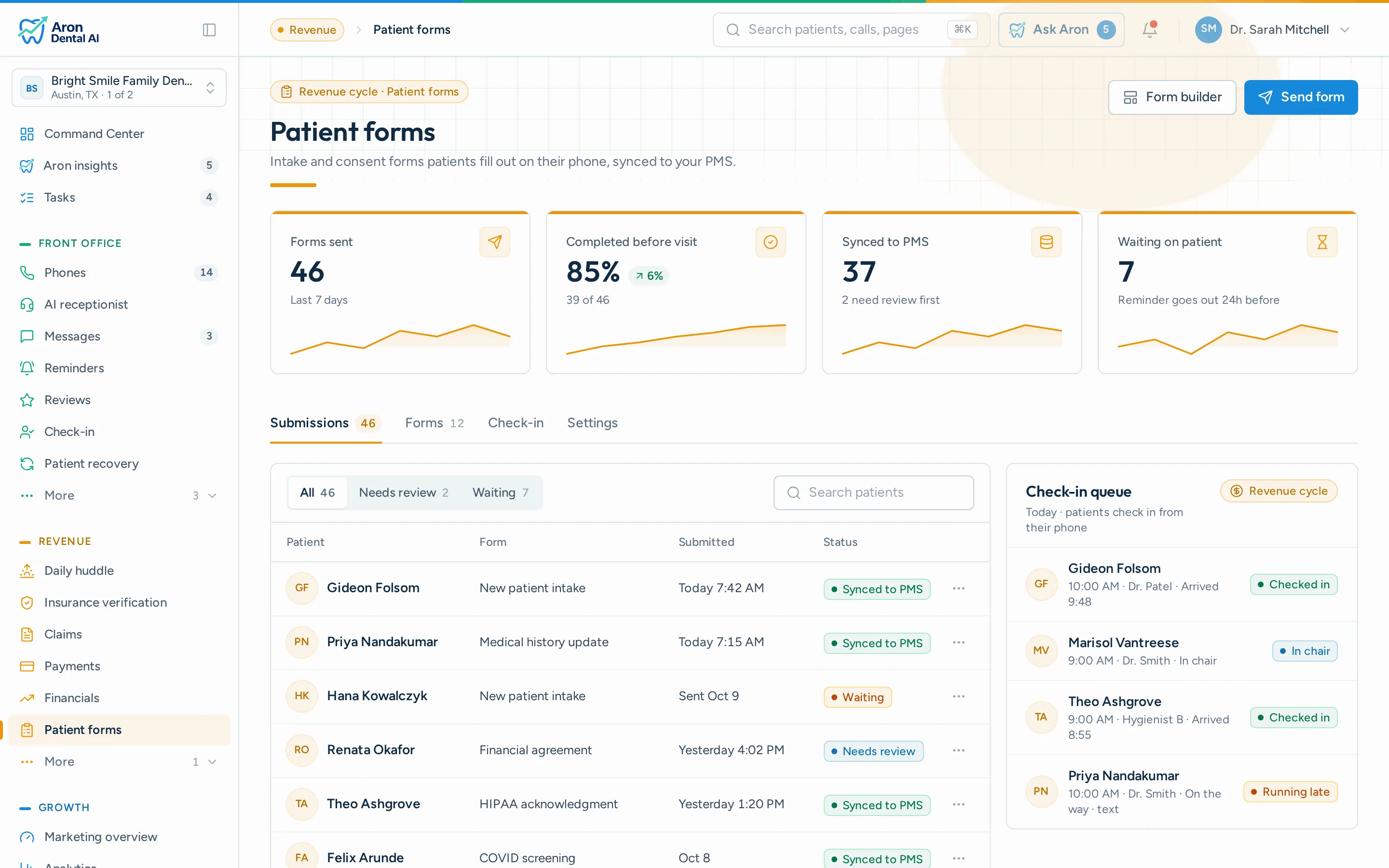
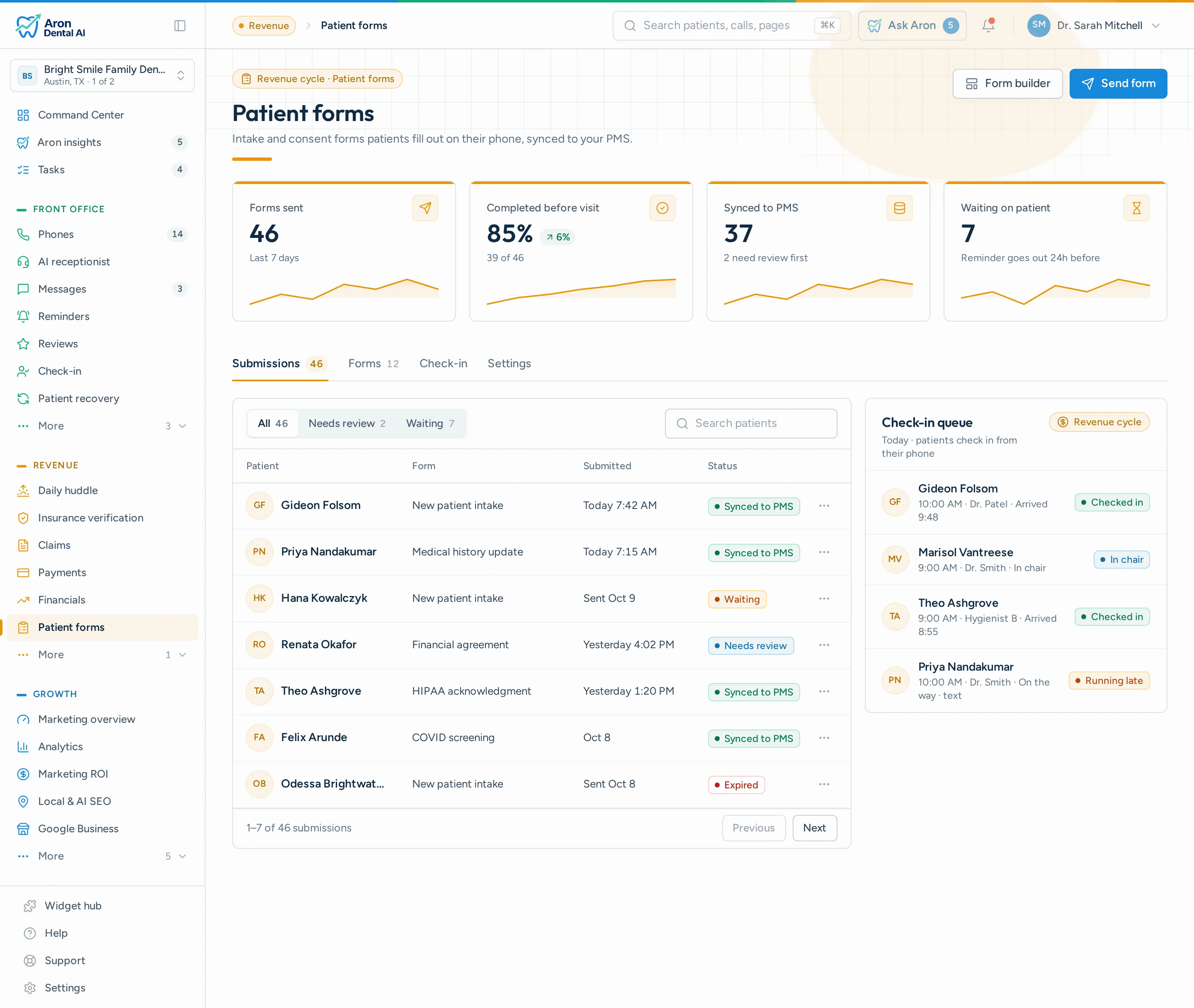
Send beautiful, mobile-friendly dental intake forms to patients via text or email. New patient registration, medical history, consent forms, all paperless and HIPAA-aligned.
Book a demo See the Basic plan · $399/moPatient forms with PMS write-back are included in Basic.
What it does
How it works in Aron
01
Create or Import
Build forms from scratch with our drag-and-drop builder, pick from 8+ medical templates, or upload a PDF and let AI convert it in seconds.
02
Send to Patients
Generate a unique, expiring link and send it via SMS, email, or share it on your website. Set an expiry date and let auto-reminders do the follow-up.
03
Patients Fill Out & Sign
Patients complete forms on their phone or computer with a clean, branded experience. E-signatures, dropdowns, checkboxes, all supported.
04
Written back to your PMS
Completed forms write back into your practice management system automatically. Your team is notified instantly and can review each submission in the dashboard.
Included
What's included
- Mobile-First Forms — Patients fill out forms on any device, phone, tablet, or desktop. No app download required. Just tap the link and start.
- E-Signatures Built In — Legally binding electronic signatures with touch/stylus drawing. No printing, scanning, or faxing required. Captures timestamp and IP for a full audit trail.
- Send via SMS or Email — Text or email form links directly to patients. Pre-fill their name and contact info so they can complete forms in minutes.
- Auto-Reminders & Expiry — Patients who haven't completed their form get an automatic reminder 24 hours later. Links expire after a set date, no stale forms floating around.
- Instant Staff Notifications — Your front desk gets an email the moment a patient completes a form, with their name, form title, and a direct link to review the submission.
- Download as PDF — Download any completed submission as a branded PDF for your records.
- Form Packets — Bundle multiple forms into a single link for new patient onboarding. One link, all forms completed in sequence.
- AI PDF Digitizer — Upload your existing paper forms as PDFs and our AI converts them into digital, fillable forms instantly. Preserve your layout, automatically.
- HIPAA-aligned — All submissions are encrypted in transit and at rest. Patient data is securely stored and accessible only to your practice.
Outcomes
What changes for your practice
< 5 min
average patient completion time
100%
paperless intake
Works with the PMS you already use
- Open Dental
- Dentrix
- Eaglesoft
- Curve Dental
- Denticon
- Dolphin
- Tracker
- Cloud 9
Questions?
What types of dental patient forms can I create?
Any form your dental practice needs: new patient registration, dental medical history, HIPAA consent, insurance verification, treatment consent, periodontal screening, cosmetic consultation, orthodontic intake, and custom forms. Our builder supports 15+ field types including text, dropdowns, checkboxes, dates, e-signatures, and more.
How do dental patients access the forms?
Patients receive a unique, secure link via text message or email before their dental appointment. They tap the link, enter their name, and start filling out the form, no login or app download needed. Most patients complete their dental intake forms in under 5 minutes.
Does it work with dental practice management systems like Dentrix and Open Dental?
Yes. Completed dental patient forms write back into the patient's chart in your practice management system automatically, so your team never has to download and re-attach them. You can still download any submission as a branded PDF if you want a copy.
Do dental patients get reminders if they forget to fill out forms?
Yes. If a patient hasn't completed their dental intake form within 24 hours of receiving the link, Aron automatically sends them a reminder via the same channel (SMS or email). You can also set links to expire after 7, 14, or 30 days so stale links don't stay active indefinitely.
How does my dental team know when a form is submitted?
The moment a patient submits a dental form, your front desk receives an email notification with the patient's name, the form title, and the submission time. Your team can prepare the chart before the patient arrives without checking the dashboard manually.
Can I send multiple dental forms at once for new patients?
Yes! With Form Packets, you can bundle multiple dental forms (e.g., new patient registration + dental medical history + HIPAA consent + financial policy) into a single link. Patients complete them in sequence, so one link covers the entire onboarding process.
Is the e-signature on dental consent forms legally binding?
Yes. Our e-signatures comply with the ESIGN Act and UETA. Each signature captures the drawing, timestamp, and IP address for a complete audit trail, meeting the requirements for dental treatment consent and HIPAA acknowledgments.
Can I convert my existing paper dental forms to digital?
Absolutely. Upload any PDF of your current dental forms to our AI-powered digitizer and it will automatically extract the fields and create a digital version you can customize. Keep the same layout your staff is used to, now fully digital.
Is patient dental data HIPAA-aligned and secure?
All dental patient data is encrypted in transit (TLS 1.3) and at rest. Submissions are stored in our HIPAA-aligned infrastructure with role-based access control. Only your dental practice can view submissions.
Ready to Ditch Paper Forms at Your Dental Practice?
Join dental practices saving hours every week with digital patient intake forms that patients love.