
Best Dental Appointment Reminder Software in 2026 (8 Compared)
Compare 8 dental appointment reminder software options for 2026: text, email and voice reminders, two-way confirmations, PMS sync and contract terms.
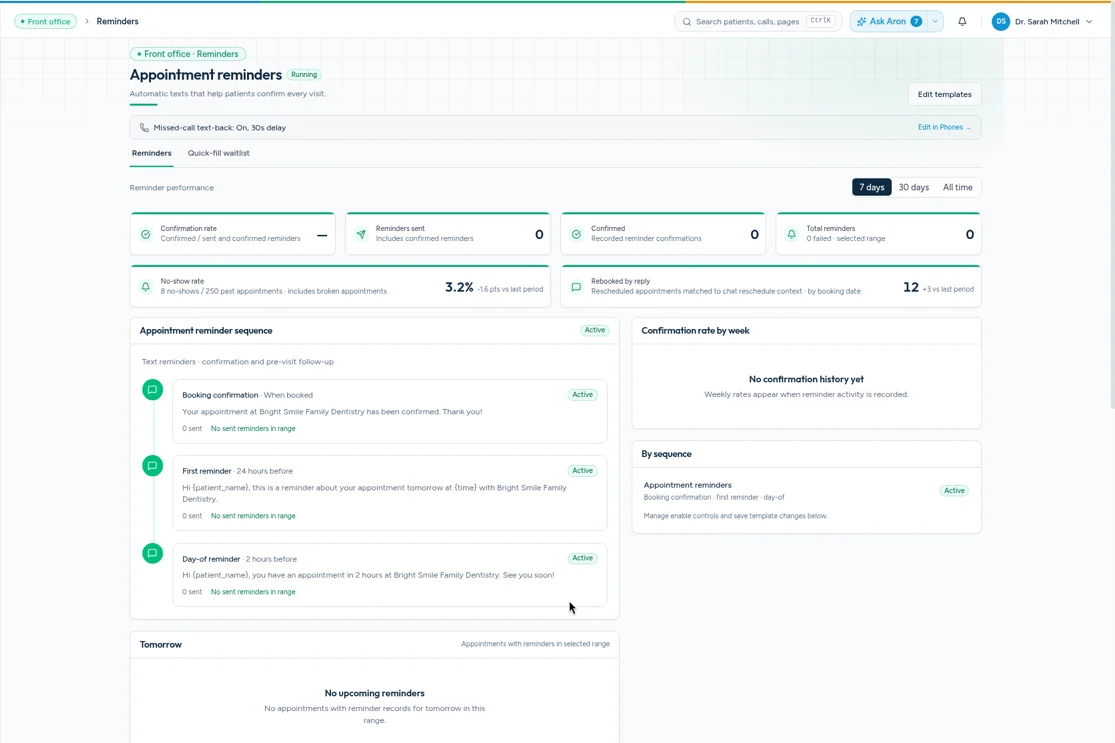
A missed appointment rarely starts at the front desk. It usually starts weeks earlier, when a patient books a cleaning, life gets busy, and nobody reminds them until it's too late to fill the chair. Good dental appointment reminder software fixes that quietly in the background. It texts the patient at the right time, lets them confirm with one reply, and moves the change straight onto your schedule so your team isn't chasing confirmations all morning.
This guide compares eight reminder tools dental offices use in 2026. We looked at how each one sends reminders, whether patients can reply, how it connects to your practice software, and what each company says publicly about pricing and contracts. Where a company doesn't publish pricing, we say so instead of guessing.
Full disclosure: Aron is our product, and it's on the list. We've kept every other description to what each company says on its own website, so you can check it yourself.
The quick list
- Aron — best for practices that want reminders, booking and phones in one place
- Weave — best for phone-centered offices that want texting built in
- Lighthouse 360 — best for long-time Henry Schein One offices
- Solutionreach — best for multi-specialty groups
- RevenueWell — best for marketing-heavy practices
- Adit — best for practices that want a broad all-in-one platform
- Doctible — best for practices that want customizable plans
- Yapi — best for offices that want forms and reminders together
What to look for in dental appointment reminder software
Before comparing tools, it helps to know what actually separates a good reminder system from a basic one.
Two-way confirmations that update the schedule
A reminder that only says "see you Tuesday" helps a little. A reminder that lets the patient reply "C" to confirm, with that confirmation showing up on the schedule, saves your team real work. Ask each vendor what happens on the schedule when a patient confirms, cancels or asks to reschedule.
Text, email and voice, with a sensible default
Most patients read texts, some prefer email, and some older patients still like a phone call. You want software that lets you pick a channel for each patient, not one that blasts all three. If you're still deciding on a mix, our breakdown of SMS vs. email vs. voice walks through the trade-offs.
Timing you control
You should be able to set when reminders go out, such as right after booking, a few days before and the morning of. Look for different rules for different appointment types too. A new-patient exam and a crown seat need different instructions.
Practice management software integration
Reminders are only as good as the schedule they read from. Confirm the tool supports your practice management system, and ask whether it reads and writes appointments or only reads them.
What happens when a patient replies with a question
Patients don't always reply "C". They write "can I come at 3 instead?" or "is Dr. Peterson in on Friday?" Ask who sees those replies, and how fast. Some tools put them in a shared inbox, and some route them to an AI assistant that can answer and rebook.
Security and contracts
Reminders contain patient names and appointment details, so ask whether the vendor will sign a BAA. Ask about contract length before you sign anything, since some tools require annual agreements.
The 8 best dental appointment reminder software options
1. Aron
Aron is a dental growth and operations platform. Appointment reminders are one part of it, alongside two-way texting, online booking, an AI receptionist and a phone system. Reminders go out automatically by text and email on the schedule you set, and patients can reply to confirm, cancel or ask to move their visit.
What makes Aron different is what happens after the patient replies. When your practice software is connected, Aron's online booking writes appointments straight onto your schedule in real time and sends the patient an instant confirmation text. If a patient calls or texts after hours to reschedule, the AI receptionist picks up 24/7 in English or Spanish, so a Friday-night "can I move my cleaning?" doesn't sit in a voicemail box until Monday. Unconfirmed patients can be flagged for your team, and lapsed patients can flow into patient reactivation campaigns.
Best for: Practices that want reminders, booking, texting and phones on one platform instead of three or four separate tools.
Watch-outs: If all you need is basic reminders and nothing else, a single-purpose tool may be simpler.
Pricing: Pricing on request. No long-term contracts.
Security: HIPAA-aligned, and we sign a BAA.
2. Weave
Weave is a patient communication platform built around its phone system and texting. Its pricing page lists appointment reminders, schedule confirmations ("let patients confirm over text") and two-way texting among its plan features, along with VoIP phones.
Best for: Offices that want their reminders and texting tied closely to a phone system.
Watch-outs: Reminders are one feature among many, so compare plans to see which tier includes what you need.
Pricing: Starts at $199/mo for the base plan, per Weave's pricing page ("starting from $199 per month", as listed Oct 25, 2026); commonly needed features and add-ons cost more. Weave lists Pro, Elite and Ultimate plans plus Enterprise, and higher-tier and Enterprise pricing is on request.
3. Lighthouse 360
Lighthouse 360 is Henry Schein One's patient communication software. Henry Schein One says it automates patient reminders, confirmations and reviews, with appointment reminders by text, email and voicemail, plus pre-visit forms.
Best for: Practices already working in the Henry Schein One family of products.
Watch-outs: Check how it works with your specific practice management system if you're not on a Henry Schein One product.
Pricing: Pricing on request.
4. Solutionreach
Solutionreach is patient engagement software used across healthcare, not only dentistry. It says it automates reminders, insurance verification, forms and payment, and its feature list includes appointment reminders, two-way texting, online scheduling and an AI receptionist.
Best for: Groups with dental and non-dental locations, or practices that want one engagement tool across specialties.
Watch-outs: Solutionreach's pricing FAQ says it offers yearly contract options, so ask about terms up front.
Pricing: Pricing on request.
How many appointments is your practice losing?
Our free scorecard looks at your online presence, booking path and patient follow-up, then shows where patients slip through the cracks. It takes a few minutes, and you'll get a clear list of fixes.
Get my free scorecard5. RevenueWell
RevenueWell describes itself as all-in-one dental marketing software. Its patient engagement tools include appointment reminders, online forms, messaging, reviews and campaigns, and it offers an AI receptionist. Its homepage says monthly and annual contracts are available.
Best for: Practices that want reminders bundled with email marketing and campaigns.
Watch-outs: The emphasis is on marketing, so check the depth of the reminder settings if confirmations are your main need.
Pricing: Pricing on request.
6. Adit
Adit is an all-in-one patient communication and engagement platform for dental practices. It combines calls, messaging, scheduling, forms, payments and automation, with reminders as part of the platform. Adit's pricing FAQ says its tech packages have no binding contracts.
Best for: Practices that want a broad platform and like having many modules to choose from.
Watch-outs: With so many modules, make sure you know which ones you're actually paying for.
Pricing: Pricing on request. Adit's pricing page asks you to request a demo to discuss options.
7. Doctible
Doctible offers patient communication and marketing tools, including reminders, smart messaging, voice reminders and scheduling, forms and recall tools.
Best for: Practices that want a customizable plan.
Watch-outs: Doctible's FAQ says most customers are on annual contracts, though it also offers month-to-month.
Pricing: Custom plans, priced on request. Most customers are on annual contracts with monthly invoices, and month-to-month is offered, per Doctible's pricing FAQ.
8. Yapi
Yapi is dental patient engagement software. It says it automates forms, reminders, insurance verification and communication, and its product list includes online scheduling and online forms.
Best for: Offices that want reminders and digital forms tightly connected.
Watch-outs: Compare its phone and AI features with the other tools here if after-hours calls are a pain point.
Pricing: Pricing on request.
Side-by-side comparison
| Software | Type | Reminder channels (per vendor site) | Contracts (per vendor site) | Pricing |
|---|---|---|---|---|
| Aron | Growth + front desk platform | Text, email | No long-term contracts | Pricing on request |
| Weave | Phones + texting | Text | Check with vendor | Base plan from $199/mo; higher tiers and add-ons cost more |
| Lighthouse 360 | Patient communication | Text, email, voicemail | Check with vendor | Pricing on request |
| Solutionreach | Healthcare patient engagement | Text | Yearly options | Pricing on request |
| RevenueWell | Marketing + engagement | Text, email | Monthly and annual | Pricing on request |
| Adit | All-in-one platform | Text, email | No binding contracts | Pricing on request |
| Doctible | Communication + marketing | Text, voice | Annual or month-to-month | Pricing on request (custom plans) |
| Yapi | Patient engagement | Text | Check with vendor | Pricing on request |
How to set up dental appointment reminders that patients actually answer
Picking software is half the job. The other half is the messages themselves. A few practical habits help:
- Send three touches, not ten. Send a confirmation right after booking, a reminder two to three days before, and a short note the morning of. More than that starts to feel like nagging.
- Ask for one easy action. "Reply C to confirm" works better than "please confirm your appointment at your earliest convenience."
- Name the practice and the provider. "Hi Maria, this is Bright Smiles Dental. You're seeing Dr. Peterson Tue at 9:00 AM" is clear at a glance.
- Give a way out that isn't a no-show. Include a reschedule option in every reminder. A patient who moves their visit is better than one who just doesn't come.
- Match the language. If a patient prefers Spanish, send their reminders in Spanish.
If you want copy-paste wording, our reminder text templates cover confirmations, day-of reminders, new patients, recall and more.
Reminders work best when they're connected to booking
The most common reminder failure isn't the text. It's what happens next. A patient replies "can we do Thursday?", and the message sits in an inbox while the original slot goes empty. That's why we'd suggest judging reminder software by the whole loop: the reminder goes out, the patient replies, the schedule updates, and the open slot gets offered to someone else.
If you're also reviewing how patients book in the first place, our guide to the best dental scheduling software covers that side. For lapsed patients who never booked their next visit, see our roundup of recall systems.
See where your schedule is leaking
Get a free scorecard for your practice. It covers your website, Google presence, booking flow and follow-up, with plain-English fixes.
Get my free scorecardFAQ
What is dental appointment reminder software?
It's software that automatically sends patients reminders about upcoming dental visits, usually by text, email or voice. Most tools connect to your practice management software, so reminders go out based on the real schedule, and many let patients confirm or reschedule by replying.
How far in advance should dental appointment reminders go out?
Many practices send a confirmation right after booking, a reminder two to three days before the visit, and a short reminder the morning of. Adjust for appointment type. Longer procedures and new-patient visits benefit from an earlier reminder so patients can complete forms and arrange time off.
Is text or email better for dental appointment reminders?
Text is usually the best default because patients can confirm with one reply. Email works well for longer details like directions, forms and pre-visit instructions. Many practices use text for the reminder and email for the details.
Do dental reminder tools need to be HIPAA compliant?
Reminders include patient names and appointment details, so choose a vendor that takes privacy seriously and will sign a Business Associate Agreement. Aron is HIPAA-aligned, and we sign a BAA.
Can patients reschedule from a reminder text?
With many tools, yes. With Aron, when your practice software is connected, a patient can reply to reschedule, and the new appointment is written straight onto your schedule with an instant confirmation text.
Does Aron require a long-term contract?
No. Aron has no long-term contracts. Pricing is on request, and a demo takes 30 minutes.
Want to see reminders, booking and phones working together?
In a 30-minute demo we'll show you how Aron confirms appointments, handles replies around the clock in English or Spanish, and puts changes straight onto your schedule. No long-term contracts.
Book a 30-minute demo